Fill eBay listings
from product images with AI

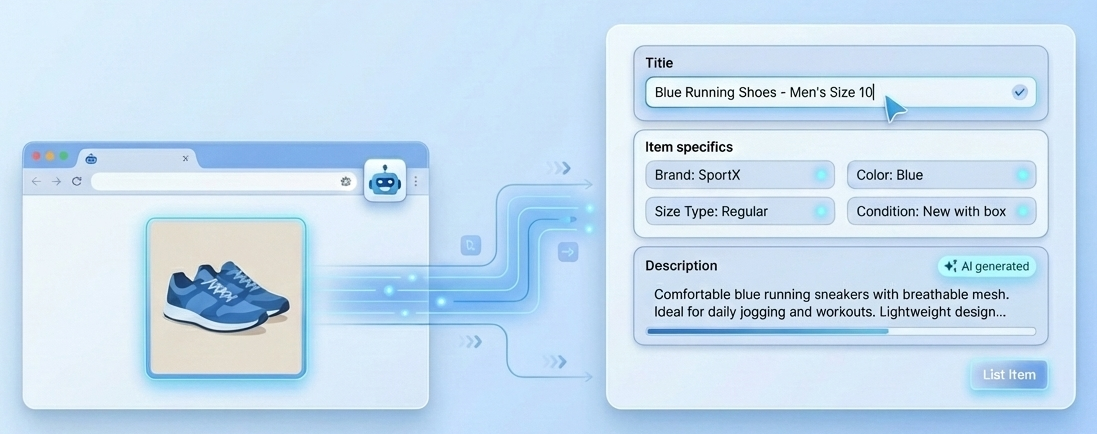
eBay Listing AI is a Chrome extension that fills Item Specifics, Title, and Description fields on eBay listings from your product image.
room screenshot shape shape
Features

List on eBay faster with AI

Upload your product image and let AI fill Item Specifics, Title, and Description directly on the eBay listing page.

shape

Fill Item Specifics

Extension detects text inputs, dropdowns, combo boxes and Yes/No fields and fills them from your image.

shape

Fill Title

Generates SEO-friendly listing titles under 80 characters with brand, key features and search terms.

shape

Fill Description

Creates clean, professional product descriptions up to 100 words, ready to review and publish.

shape

Free during beta

Up to 300 listings per month at no cost. No credit card — just a free Google Gemini API key.

About Us

Turn product photo into eBay listing fields.

eBay Listing AI is a Chrome extension that works directly on eBay listing creation pages. Upload a product image and click the AI button next to any field — Item Specifics, Title or Description — to have it filled automatically.

Our goal is to remove the tedious parts of listing on eBay so you can publish faster and focus on selling. Whether you list a few items a week or hundreds a month, the extension adapts to the eBay form and does the typing for you.

about-image
shape
FAQ

Any Questions? Answered

Find answers to commonly asked questions about eBay Listing AI.

Install the extension from the Chrome Web Store, open any eBay listing creation page and upload a product image. Then click the AI button next to Item Specifics, Title or Description, and the field will be filled automatically.
Yes. During the beta period the extension is completely free for up to 300 listings per month. No credit card required — you only need a free Google Gemini API key.
The extension fills Item Specifics (including text inputs, dropdowns, searchable combo boxes and Yes/No buttons), the listing Title, and the Description field.
Yes, you need a free Google Gemini API key, which you can get in a minute from Google AI Studio using the link we provide. Once added to the extension settings, you are ready to go.
Absolutely. Every generated value appears directly in the eBay form field, so you can review, tweak or rewrite anything before publishing your listing.
No. Your product images are sent directly to Google Gemini using your own API key to generate the content, and nothing is stored on our side.
CONTACT US
shape

nicelistermain@gmail.com

shape